
Dreniq NewsDreniq News
  • News
  • Technology
  • Business
  • Entertainment
  • Science / Health
Facebook Twitter Instagram
  • Contact Us
  • About Us
  • Privacy Policy
Facebook Twitter Instagram
Dreniq NewsDreniq News
Subscribe
  • News
  • Technology
  • Business
  • Entertainment
  • Science / Health
Dreniq NewsDreniq News
Home » News » Technology » How to add a survey in your WordPress site?
Technology

How to add a survey in your WordPress site?

Angela McCainBy Angela McCainFebruary 7, 20222 Mins Read
Facebook Twitter Pinterest LinkedIn Tumblr Email
How to add a survey in your WordPress site?
Share
Facebook Twitter LinkedIn Pinterest Email

So you are searching for how to add a survey in your WordPress site? It is a simple and straightforward process. We will guide you in this article.

1- Choose the right WordPress survey plugin.

WordPress is very powerful because it has many plugins adding various features for it. There are a lot of survey plugins you can find at the market. Most are free and some are paid.

We have chosen Quill Forms as the top WordPress survey plugin. There are many reasons for that:

A- Versatility and easy drag and drop.

B- Creative UI/UX

C- Has a free version on WordPress repo.

D- Has a lot of features you need to build your surveys.

E- Comes with a variety of blocks.

F- Compatible with all page builders.

2- Installing the chosen WordPress plugin

You can simply do that by searching for: Quill Forms or download it directly from here: Typeform WordPress plugin.
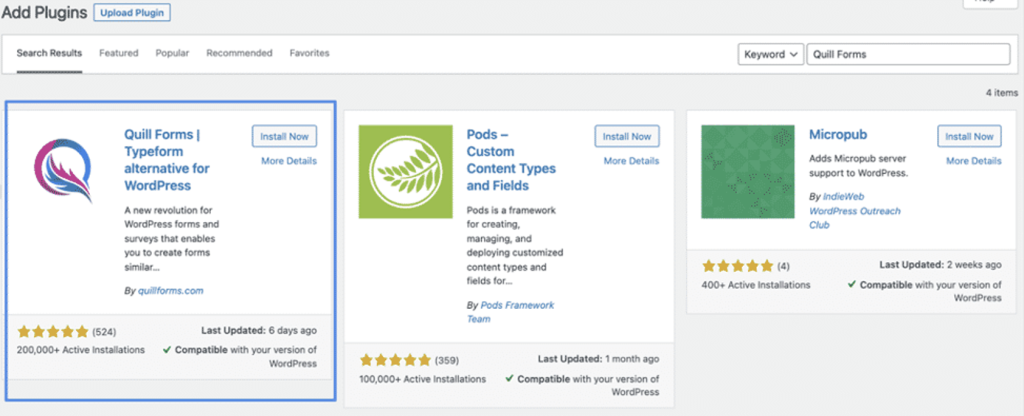
After installing the plugin, you should activate it.

3- Build your first survey

This is the step you will enjoy really since Quill Forms is the best plugin as a builder. It is an effortless step and you will only have to drag and drop blocks easily. First, you have to click on “Quill Forms” then “all forms” then create a new one easily.
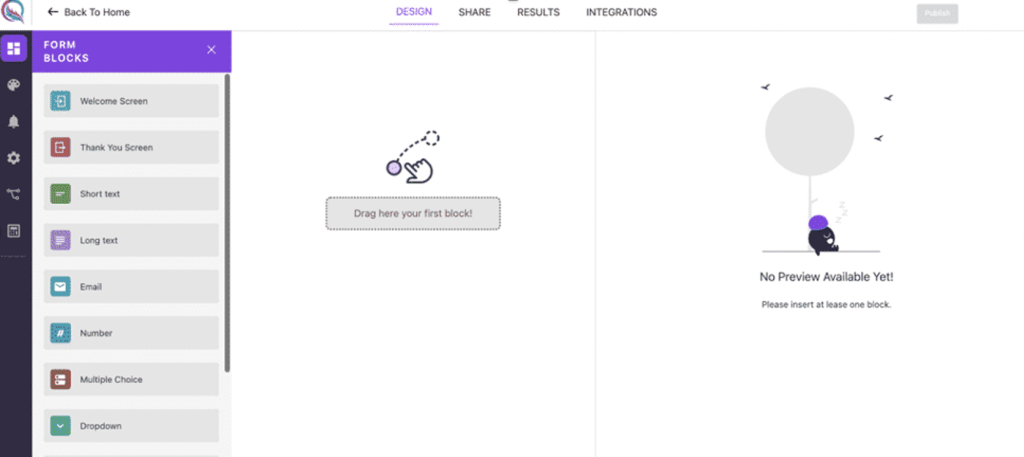
Start to drag and drop the blocks you need to build your survey and that’s it!

At the right side, you will have the preview of your survey and you can test the logic instantly with it. By “logic”, we mean the jump logic or calculator which are features on the pro version.

4- Save changes and publish the survey

You have to hit “publish” to save your changes and then click “Share” and you will have a modal for sharing your survey.

You will have 2 options:

First, to have the survey published as a standalone page.

And the second one is to have an iframe code for it. You will just have to copy the iframe code and paste it in your page and that’s it.

Conclusion

In this article, we explained how to add a survey to your WordPress site. We have chosen Quill Forms because it is a free Typeform alternative for WordPress and it is a very advanced builder with awesome features.

Share. Facebook Twitter Pinterest LinkedIn Tumblr Email
Previous ArticleHow Technology is affecting the iGaming industry in 2022
Next Article Best Way to Fake GPS Location on Phone in 2022 (both iPhone and Android)
Angela McCain

Angela is a senior editor at Dreniq News. She has written for many famous news agencies.

Related Posts

State of HP-3000 in 2026: How to Keep Your Mission-Critical Systems Running

May 6, 2026

Stop Watching, Start Breaking: Why Your 50th ‘To Do List’ Tutorial is Actually Making You Dumber

April 11, 2026

Navigating Japan with eSIM: A Traveler’s Essential Guide

April 7, 2026
Follow Us
  • Facebook
  • Twitter
  • Instagram
  • YouTube
Google News
Lastest Articles
How debt mutual funds work: A beginner-friendly guide to investing in mutual funds
May 16, 2026
How OTT Bundled Prepaid Plans Are Changing Mobile Entertainment
May 12, 2026
How to Safely Introduce a Child to a Dog
May 10, 2026
Top Girls Cycle Designs for School and Fun Rides
May 9, 2026
Why fixed-income funds are becoming core to modern asset allocation
May 9, 2026
Renae Bryant: Supporting Effective School Communication Through NSPRA
May 7, 2026
How to open a Zero Balance Account online and link it to other financial services
May 7, 2026
State of HP-3000 in 2026: How to Keep Your Mission-Critical Systems Running
May 6, 2026
What All Beginners Need to Know About Playing Online
May 5, 2026
Cdmon combines domain registration with email and micro hosting to help users get started online
April 30, 2026
A beginner’s guide to MSME registration in India for small businesses
April 21, 2026
Sydney Palmer: Building a Rotational Program That Works from Start to Finish
April 21, 2026
Dreniq News
Facebook Twitter Instagram YouTube RSS
  • Contact Us
  • About Us
  • Privacy Policy
2026 © Dreniq

Type above and press Enter to search. Press Esc to cancel.