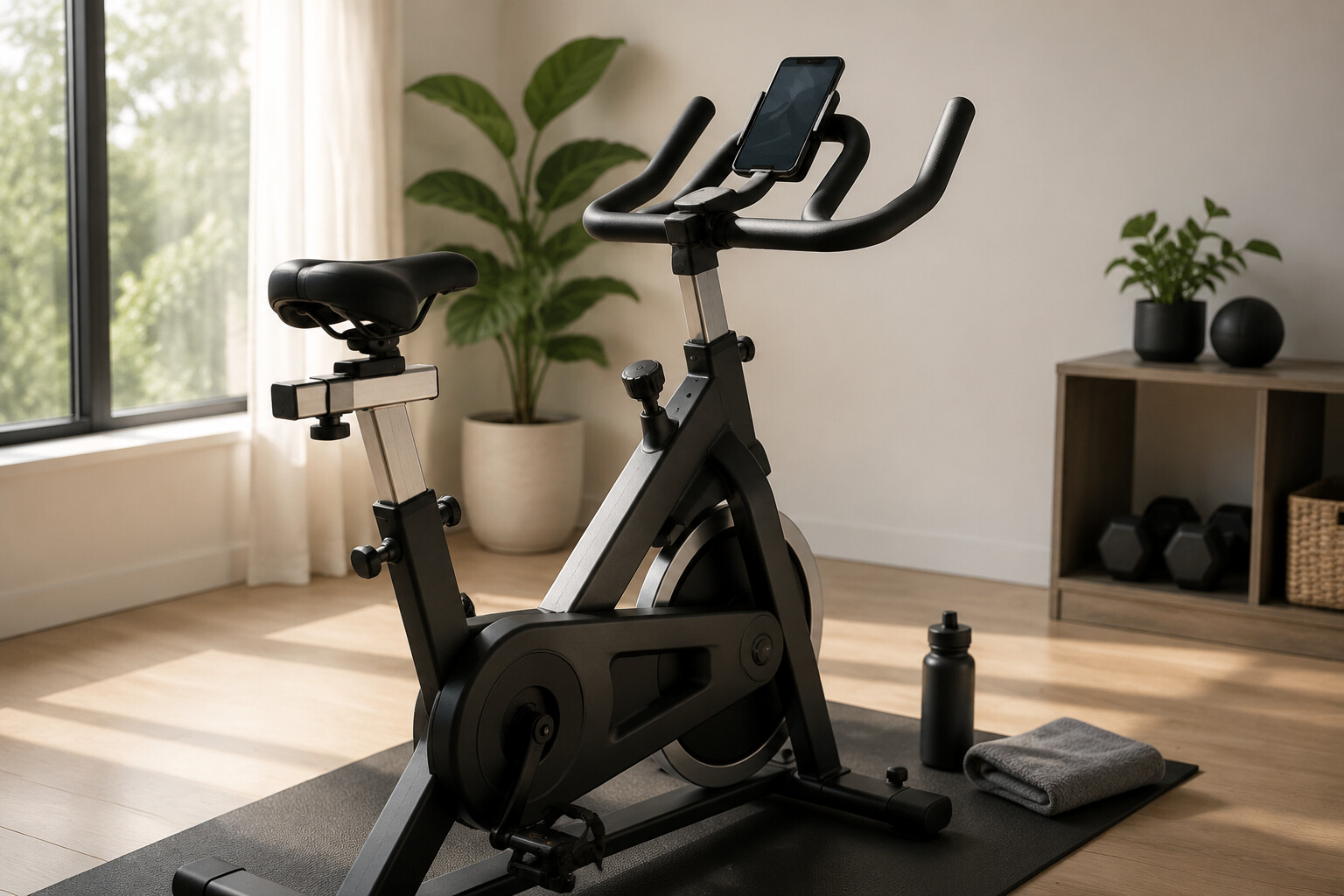
A home workout area does not need to contain numerous devices or complicated technology. An exercise bike and a cell phone can form a practical setup when each item is selected, positioned, and used according to the owner’s space, routine, and personal requirements. The bike provides a stationary platform for indoor cycling, while the phone can support scheduling, entertainment, communication, and access to compatible fitness applications.
Before using an exercise bike, the rider should review the manufacturer’s assembly and operating instructions. The seat, handlebars, pedals, resistance controls, and stabilizers should be inspected before a workout begins. Adjustment options differ between models, so users should follow the product manual rather than relying on a general setup that may not apply to their equipment.
The surrounding area also requires attention. The bike should be placed on a suitable surface with enough clearance for safe entry, movement, and exit. Power cables, charging cords, rugs, and nearby furniture should not interfere with the pedals or the rider. If the floor needs protection, users can check whether the bike manufacturer recommends a compatible equipment mat.
A cell phone may be used to play music, display a workout timer, follow a training video, or connect to supported equipment. However, the device should be secured in a holder designed for the bike and phone size. Holding or adjusting the phone while pedaling may distract the rider and affect stability. Notifications can also be limited during the session when they are not required.
Not every exercise bike supports Bluetooth, mobile applications, or direct workout-data synchronization. Buyers should verify these features in the official product specifications before purchasing accessories or subscriptions.
A useful home cycling setup depends on preparation rather than the number of available features. By checking equipment, organizing the space, and using a cell phone responsibly, riders can create a routine that is structured, accessible, and easier to maintain.
Choosing an Exercise Bike for Your Space and Routine
Selecting an exercise bike begins with understanding where it will be placed, who will use it, and which functions are genuinely required. Product descriptions may list many features, but their value depends on the rider’s available space, physical requirements, workout preferences, and technology setup. Creating a checklist before comparing models can make the purchasing process more focused.
The first consideration is the bike’s dimensions. Buyers should review the assembled length, width, and height rather than relying only on package measurements or product images. Additional clearance may be needed around the equipment for mounting, dismounting, adjustment, and maintenance. The listed product weight and transportation wheels can also be relevant when the bike must be moved between rooms.
Adjustment options should be reviewed carefully. Depending on the model, the seat may move vertically, horizontally, or in both directions, while the handlebars may offer limited or multiple positions. Buyers should examine the manufacturer’s recommended user-height range, weight limit, and adjustment instructions. If several household members will use the same bike, accessible controls and repeatable settings may support easier transitions between users.
Resistance systems, drive mechanisms, pedals, displays, and power requirements vary across indoor cycling products. Some models use manual controls, while others include electronic settings or structured programs. Buyers should confirm what is included with the bike and identify accessories that must be purchased separately.
A cell phone holder may appear in product photographs without being included in the package. Its dimensions should also be checked to confirm that it can securely accommodate the user’s device and protective case. For connected models, buyers should verify operating-system compatibility, Bluetooth requirements, supported applications, account registration, and any subscription terms.
Purchase decisions should also account for delivery, assembly, warranty coverage, return conditions, and replacement-part availability. These details can influence the total ownership experience even when two bikes appear similar.
A suitable exercise bike is one that matches documented household requirements. Comparing verified measurements, adjustment ranges, operating features, and cell phone compatibility can help buyers avoid paying for functions they cannot use or overlooking limitations that affect their routine.
Using a Cell Phone During an Indoor Cycling Session
A cell phone can support an indoor cycling routine by providing access to timers, music, videos, training applications, and communication tools. Its usefulness, however, depends on how it is positioned and operated. Riders should prepare the device before beginning a session so that screen adjustments and application searches do not interrupt movement on the exercise bike.
A compatible phone holder can keep the device visible without requiring the rider to hold it. Before use, the mount should be checked for stability, size compatibility, adjustment limits, and any instructions provided by its manufacturer. The phone, including its protective case, should fit within the holder’s stated dimensions. The mount should not interfere with the handlebars, resistance controls, display, cables, or the rider’s normal hand position.
Screen placement also requires attention. A device positioned too low, too high, or far to one side may encourage an uncomfortable viewing position. Riders can adjust the holder while the bike is stationary and confirm that the screen can be viewed without repeatedly turning or lowering the head. If the device cannot be positioned appropriately, audio instructions may be a practical alternative to continuous screen viewing.
Fitness applications can record session duration, estimated distance, cadence, resistance, or other information when supported by the bike and connected sensors. Available measurements vary by equipment and application. Users should not assume that values from different devices will match, and consumer fitness data should not be treated as a medical diagnosis or a substitute for advice from a qualified healthcare professional.
Privacy settings should be reviewed before connecting an application to personal accounts or sharing workout activity. Users can examine permissions for location, contacts, health information, Bluetooth access, and background activity. Subscription terms and automatic renewal conditions should also be checked before starting a trial.
Notifications, messages, and calls may distract the rider. A focus mode or selected notification settings can limit interruptions while preserving access to essential communication. By securing the phone, preparing content in advance, and reviewing application settings, riders can use mobile technology as an organized part of the workout rather than a source of unnecessary distraction.
Building a Structured Indoor Cycling Routine
A structured routine can make an exercise bike easier to include in a weekly schedule. The routine does not need to begin with complicated programs or performance targets. It can start with a clearly defined session, a prepared workout area, and a simple method for recording what was completed. A cell phone can support this process through calendar reminders, timers, notes, and compatible fitness applications.
Before the session, the rider can decide its general purpose and review the equipment setup. The bike should be inspected according to the manufacturer’s instructions, and the seat, handlebars, pedals, and resistance should be adjusted while the equipment is stationary. Water and any required accessories can be placed within reach without creating an obstruction around the bike.
The phone can be used to organize the session into planned stages, such as preparation, cycling, and recovery. The duration and intensity of each stage should match the rider’s experience, health status, and guidance from qualified professionals. Users should avoid copying another person’s workout automatically because equipment settings, physical abilities, and health considerations can differ.
After cycling, a brief record may help the rider understand how the routine is developing. Notes can include the session date, duration, resistance setting, perceived difficulty, equipment adjustments, and any technical problems. Data provided by the bike or an application may also be recorded, but users should understand how each metric is calculated before comparing results across different devices.
Progress should be evaluated through consistent records rather than a single session. If a rider chooses to change the routine, adjusting one element at a time may make it easier to understand the effect. Training applications can provide structure, but they cannot evaluate every user’s medical condition or physical response.
Anyone starting or changing an exercise program should consider professional medical guidance, particularly when health concerns, injuries, pregnancy, prescribed limitations, or unexplained symptoms are present. Exercise should be stopped when concerning symptoms occur, and appropriate medical assistance should be sought.
By combining equipment preparation, realistic scheduling, responsible phone use, and personal observation, riders can create an indoor cycling routine that remains organized and adaptable.
Maintaining the Exercise Bike and Connected Phone Setup
Regular care can help keep an exercise bike and its connected accessories ready for use. Maintenance requirements vary between models, so the product manual should remain the primary reference for cleaning, inspection, adjustment, and replacement procedures. Users should not apply a general maintenance method when the manufacturer provides different instructions for a specific bike.
After a workout, approved surfaces can be wiped according to the care guide so moisture and residue do not remain on the seat, handlebars, frame, or console. Cleaning liquids should not be sprayed directly onto electronic components unless the manufacturer explicitly permits that method. Abrasive products, excessive moisture, and unapproved chemicals may affect finishes or components, so all cleaning materials should be selected carefully.
The bike should also be inspected while it is stationary and not in active use. Riders can check for visible damage, loose components, unusual movement, worn pedal straps, damaged power cables, or changes in operating sound. Tightening, lubrication, or part replacement should be performed only as directed in the manual. If a problem cannot be identified safely, the user should contact the manufacturer, retailer, or a qualified service provider before continuing to use the equipment.
The cell phone and its holder require separate attention. The mount should be checked to confirm that its grip, adjustment points, and attachment hardware remain secure. A damaged holder should not be trusted to support the device during cycling. The phone screen, case, and charging port can be cleaned using methods approved by the device manufacturer.
Applications used with the bike should be reviewed for software updates, account security, permissions, and subscription status. After an update, users may need to check Bluetooth connections or application settings again. Workout records can also be backed up or exported when the service provides that option.
Charging cables should be positioned away from pedals, moving parts, and walking paths. Users should follow the phone manufacturer’s charging guidance and stop using visibly damaged adapters or cables.
A short maintenance checklist can make these tasks easier to remember. Consistent inspection, careful cleaning, and responsible device management support an organized setup while helping users identify issues before the next session begins.